FOSSBilling is a free, open-source billing and client-management system. NovaPanel's integration lets a paid order create a real hosting account — account, website, DNS zone, FTP login and SSL certificate — with nobody touching the panel, and keeps the two in step for the life of that order.
API access is a Pro feature (included on Developer). On Community every call is refused, and the integration says so in plain words rather than looking like a connection fault. You also need NovaPanel 1.8.3 or newer.
What it does
| In FOSSBilling | On the server |
|---|---|
| Order activated | Account, system user, website, virtual host, DNS zone, FTP login and SSL, in one call |
| Order suspended | A real suspension — the site answers 503, and cron, mail, FTP and background workers stop |
| Order unsuspended | Everything comes back |
| Order cancelled | The account and everything it owns is removed |
| Change password | The panel password, and the FTP login with it |
| Change plan | Moves the account onto the matching hosting package |
| Log in to control panel | A single-use link; the customer arrives already signed in |
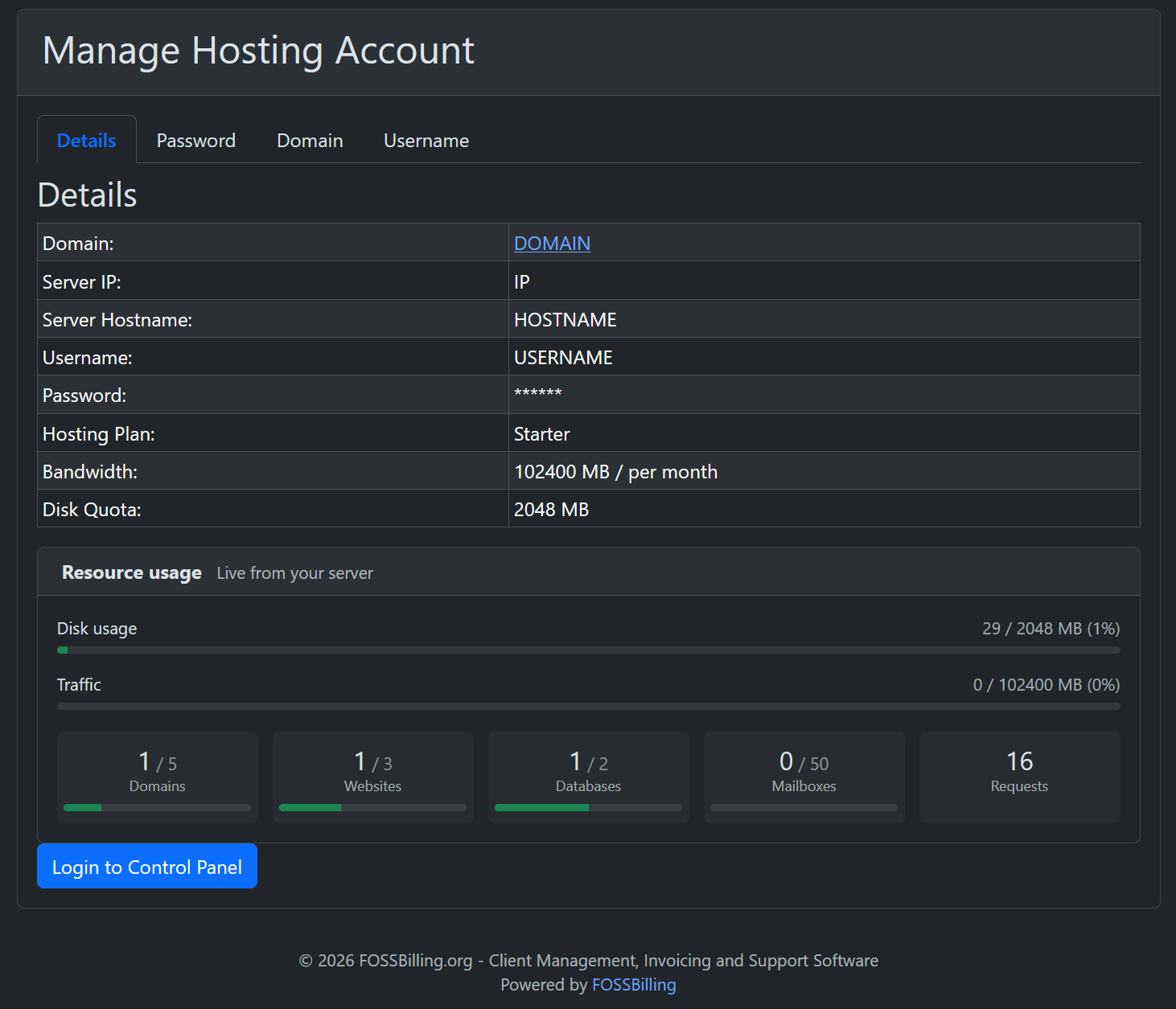
Customers also see their live usage on the order page, read from the server rather than from anything the billing system stores — disk, traffic, websites, domains, databases and mailboxes, each against the limit their package allows.
Before you start
- Create an API key in NovaPanel under Settings → API Keys,
signed in as an administrator. It starts
np_live_and is shown once. - Check FOSSBilling can reach the panel's admin port (2087 by default). The customer panel on 2083 is a different service and will not answer these calls.
- Create your hosting packages in NovaPanel under Packages. You will make FOSSBilling hosting plans with the same names shortly.
Install
Download the latest release from github.com/teriyakiuk/novapanel-fossbilling and unzip it. There are two pieces, and they go in different places inside your FOSSBilling installation:
Novapanel.php→library/Server/Manager/Novapanel.php— the server manager, which does the provisioning. Required.modules/Novapanel/→modules/Novapanel/— the module that shows customers their usage. Optional.
Keep the module's folder structure intact (Api/, Controller/,
templates/client/). FOSSBilling finds the classes by that layout, so a flattened
folder will not load. Upload the files as the user that owns the rest of your FOSSBilling
files — the panel's own File Manager does this for you.
Connect the server
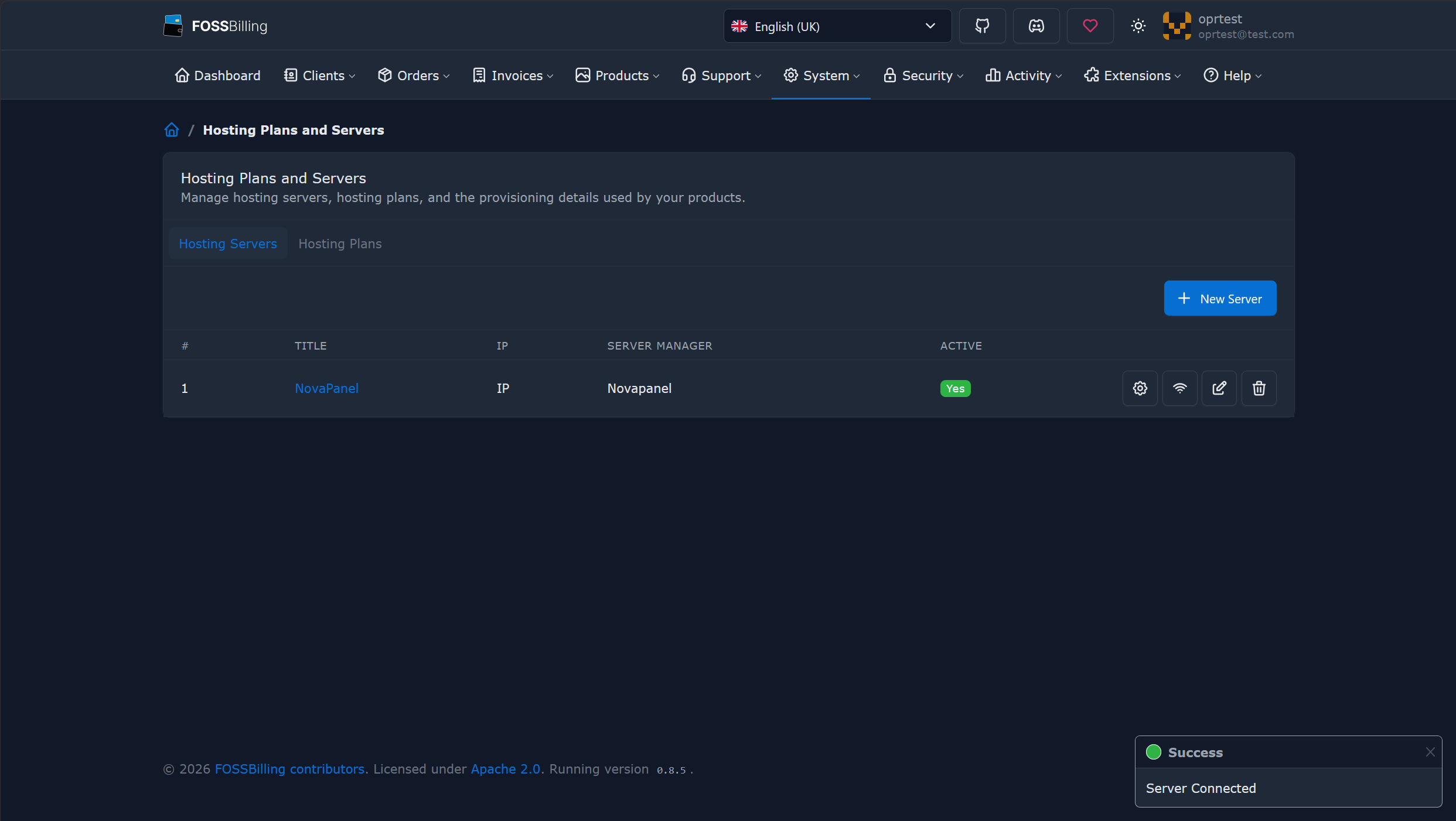
In FOSSBilling, go to System → Hosting Plans and Servers → New Server and fill in:
- Server manager — NovaPanel
- Hostname — whatever you reach the admin panel at
- Port —
2087unless you changed it - Secure connection — on
- API key — the
np_live_key you created
Then press Test connection. That makes one authenticated read, which proves the hostname, port, key and licence tier together.
If your panel uses a self-signed certificate, add {"tls_verify": false} to the
server's custom configuration field.
Products and plans
Create a hosting plan in FOSSBilling named exactly as your NovaPanel package — capitalisation does not matter, spelling does. Then create a Hosting product using that plan and this server, and give it a pricing period, or the storefront cannot render its order button.
If a plan name matches no package, the account is still created on the server's defaults and the mismatch goes to the FOSSBilling log. That is deliberate: a naming typo should not leave a paying customer with no hosting. Changing a plan is stricter and fails with the name it could not find, because silently leaving somebody on their old plan after an upgrade is worse than an error.
Show usage on the order page
Activate the module under Extensions → Modules → NovaPanel. That gives
your customers a page at /novapanel listing every hosting account they hold.

To put the usage panel on the hosting order page itself — where customers actually look
— add one line to
modules/Servicehosting/templates/client/mod_servicehosting_manage.html.twig,
immediately after the </table> that closes the Details tab:
{% include 'mod_novapanel_usage.html.twig' with { 'order_id': order.id } %}
Clear data/cache/ afterwards. That edits a FOSSBilling file rather than your theme,
so a FOSSBilling upgrade can revert it — the line just needs adding again. It is safe to
embed: the call behind it never throws, so a panel that is briefly unreachable shows a line of
text instead of taking down the page carrying the password and domain forms.
Things that look like faults but are not
Three FOSSBilling behaviours are worth knowing before you decide something is broken.
The order activated but nothing was created
The admin New Order form has an Import checkbox, on by default in some versions, meaning "this account already exists on the server, just record it". FOSSBilling then writes the service row, marks the order active, and never calls the server. There is no error anywhere, because nothing failed. Untick it.
The "log in to control panel" button asks for a password
There are two different links. The one in the admin area is generated without an account attached, and FOSSBilling's own code notes that it will not generate single-sign-on links — it is the server's general address. The auto-login link is produced in the client area, which is where a customer would click it. Test it as the client.
The site is on HTTP, not HTTPS
A certificate is requested during provisioning only when the domain already points at the server, Cloudflare proxies included. Enabling SSL for a domain aimed elsewhere would take the site offline, so when the domain is not pointed yet the account is created without one and says so. Issue it from the panel once DNS resolves.
What it will not do
- Change a username. In NovaPanel the username names the Linux user, the home directory and every PHP-FPM pool, so it cannot change after creation. Create a new account instead.
- Change the primary domain from billing. Add the domain in the panel.
- Change the account IP. NovaPanel serves every account through one edge on ports 80 and 443, so there is nothing per-account to change. This is a no-op rather than an error.
The integration is Apache-2.0 licensed and developed in the open at github.com/teriyakiuk/novapanel-fossbilling. It was built and tested against FOSSBilling 0.8.5.